

SAP Business One Shop Floor Data Capture: How Harney & Sons Runs Forge AI


Shop floor data capture in SAP Business One means recording production receipts, component issues, and batch details at the line, then posting them to SAP only after validation. Harney & Sons Fine Teas runs this today with Forge, the AI agent from Third Wave and Structify, and showed two live workflows to 150+ SAP Business One customers.
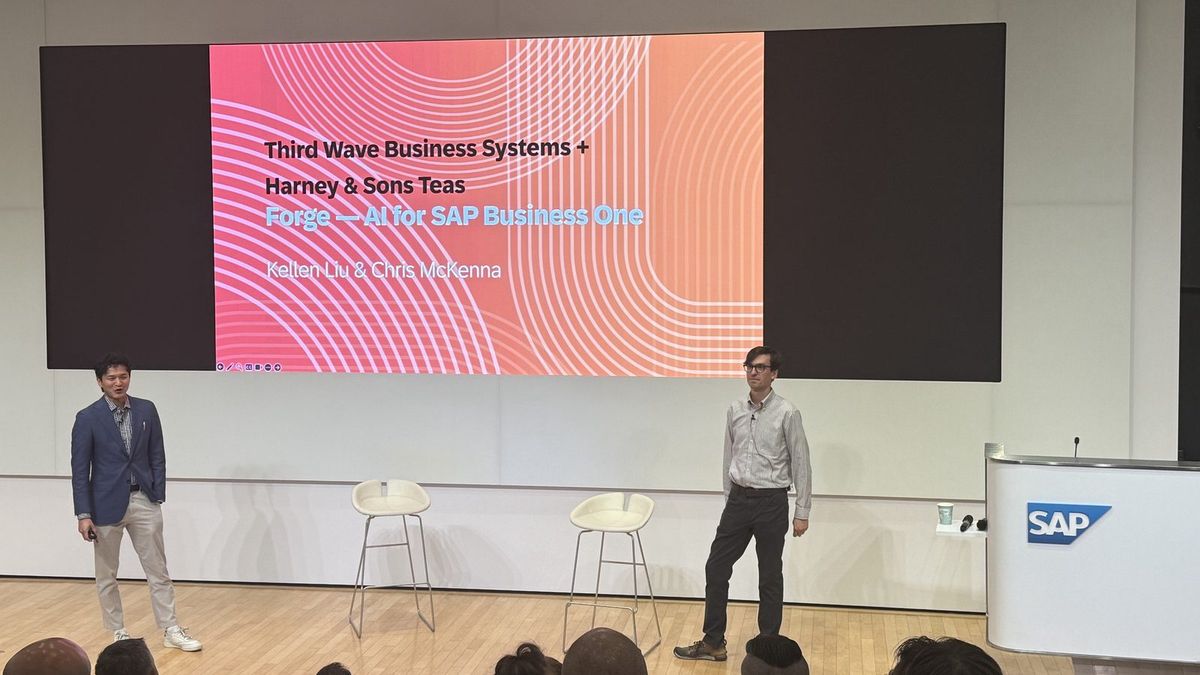
On September 15, SAP hosted the first North America SAP Business One Customer Day at SAP's North American headquarters in Newtown Square, outside Philadelphia. Chris McKenna of Harney & Sons joined Kellen Liu of Third Wave to close the day. This post walks through what Chris built, how each workflow keeps bad data out of SAP Business One, and where Forge goes next.
What Harney & Sons Brought to SAP Business One Customer Day
Harney & Sons Fine Teas, a family-owned tea blender in Millerton, New York, closed SAP Business One Customer Day with Third Wave. Chris McKenna showed 150+ SAP Business One customers two Forge workflows running in production: shop floor data capture on the production floor and AI sales order processing on the order desk.

Harney & Sons has blended and sold tea since 1983 and carries more than 300 teas and herbal blends. The company runs on SAP Business One and has worked with Third Wave since 2022. In March 2026, the Harney team started using Forge, the AI agent for SAP Business One, to change how people across the business work with SAP data.
The Harney session held the last slot on a full agenda. Earlier sessions covered SAP's strategy for the SME market, AI adoption stories from other North American companies, and the move to the SAP Business One web client. We previewed the session in August. This recap covers what the room saw.
Chris presented as the person who built and runs the workflows every day. Third Wave and Structify supplied the Forge platform and the SAP Business One expertise underneath. The story belongs to the Harney team, and the lessons apply to any manufacturer or distributor running SAP Business One on paper forms and retyped orders.
Why Production Data Goes Wrong Before Reaching SAP Business One
Production data goes wrong in SAP Business One when capture happens away from the work. At Harney & Sons, 20+ departments recorded receipts and component issues on paper, rules lived in people's heads, and errors such as duplicated receipts showed up only after inventory and product cost were already wrong.
Start with scale. Harney runs more than 20 production departments, and every department has a separate set of components, batches, and quantity limits. Sachets, filling, blending, and bagging each followed a different paper form, and staff later retyped those forms into spreadsheets by hand.
Then add food-grade traceability. Every gram of tea traces to a batch, a bin, and a production order, and every batch carries a best-before date. A gap in the paper trail becomes a gap in a recall.
Third, the rules lived in people's heads. Drying times, over-quantity limits, and who held the right to override them changed with whoever ran the shift. Two supervisors on two shifts produced two versions of the truth.
Fourth, mistakes surfaced too late. A duplicated receipt or a missed component issue came to light after posting, once inventory counts and product cost were already off. Someone then traced the error back through paper to correct the record.
None of this points to a weak team. The paper process asked people to remember rules a system should enforce. If your production data depends on memory and retyping, your SAP Business One numbers inherit every slip. We covered the wider version of this problem in The Hidden Cost of Spreadsheets in Manufacturing and Distribution.
Workflow 1: Shop Floor Data Capture at the Line
Harney's shop floor data capture workflow runs five steps. An operator submits a receipt or component issue in Forge, Forge checks the entry against SAP Business One, a supervisor reviews any exception, Forge builds the receipt or issue document, and the document posts to SAP Business One.
- The operator submits the event in Forge, on a kiosk or phone.
- Forge checks item, batch, bin, and quantity against SAP Business One.
- A supervisor reviews anything outside the department's tolerance.
- Forge builds the goods receipt or component issue.
- The document posts to SAP Business One.
Capture starts with a barcode. Operators scan the item, batch, and bin straight off the label, using a shared kiosk or the camera on their own phone. The screen shows the last known bin and quantity from SAP Business One, so the operator confirms stock before submitting. Nobody types a batch number from memory.
The review queue carries the most weight. During the session, Chris showed a test production order for hibiscus tea bags in the live queue, planned at 10 units with 19 reported done. Forge flagged the order as over-received by nine and held the entry for a supervisor. Nothing posted until a person looked at the gap.
Three safeguards sit under the workflow. First, exceptions stop and wait: a quantity beyond a department's tolerance holds for a supervisor, and nothing out of range posts silently. Second, every submission carries a unique identifier, so a page reload never creates a second SAP Business One document. Third, Forge logs every event with who submitted the entry, when, and which SAP document resulted, including failed attempts.
The same rules now apply every shift. Quantity limits, drying times, and override rights live in the system instead of in a supervisor's memory. When Harney adds a department, a rule, or a new line type, the team extends the same workflow rather than starting a new implementation. For more on how production teams run on SAP Business One, see our manufacturing industry page.
SAP Business One stays the system of record throughout. Forge handles capture, checks, and review. SAP Business One holds the inventory, the batches, and the cost.
Workflow 2: AI Sales Order Processing From Email and PDF
Harney's AI sales order processing workflow reads customer purchase orders as they arrive by email or PDF, matches every line to the SAP Business One item catalog, and scores each match against what the customer has bought before. Anything Forge is unsure about waits for a rep before reaching SAP Business One.
The old process will look familiar to many distributors. Customer POs arrived as PDFs and email text. Reps looked up the customer in SAP Business One, hunted down item numbers and customer catalog numbers, built a spreadsheet, and retyped the order line by line. A miscopied item or pack size surfaced downstream, and no one had a record of who sent what, or when.
Forge now reads the order as the customer wrote the order. In the session, a sample email listed lines such as a case of 50 one-ounce Paris iced tea. Forge matched each raw phrase to the SAP Business One item, gave the match a confidence score, and listed lower-scoring alternates beside the pick. Matches backed by the customer's purchase history rank highest, because a customer who bought an item last month most likely wants the same item today.
When Forge finds no match, the workflow stops. A second sample order, from a sender with no business partner record, listed lines like five sachets of rooibos chai. Forge left every line unmatched and routed the order to a rep. Nothing posts until a rep approves, rejects, or corrects the match.
The second output is a pre-filled order form. A rep enters a business partner code and an email address, and Forge generates an Excel order form with the customer's items already filled in. The template history lists every form, who requested the form, when, and how each request ended, including the failures and the reason for each.
One guardrail matters more than the rest. Generating an order form never creates a sales order in SAP Business One and never changes business partner or item master data. Posting is a separate, reviewed step.
For the order desk, the gains show up in four places: faster order prep with no manual lookups, less retyping, the same structured form from every rep, and room to take on more customers and more inbound orders without a matching rise in manual work. Distributors facing the same inbound order load will find more on our distribution industry page.
Why Both Workflows Keep a Person Before Every SAP Posting
Both Harney workflows follow one rule: nothing reaches SAP Business One unreviewed. Forge reads, checks, and prepares the data, a person confirms anything uncertain, and only then does SAP Business One receive the document. This human review step is why Harney trusts AI output inside a food-grade, batch-traced ERP.
Chris framed the session around a four-step loop. A person enters new data. Forge checks the data against SAP Business One. A rule or a reviewer verifies the data. Then, and only then, Forge writes to SAP Business One.
The closing slide put the point plainly. Reading a form is the easy part for AI today. The harder question is what counts as true between AI and your ERP. Harney's answer: SAP Business One stays the source of truth, and every AI step either proves a match or asks a person.
This design answers the first objection SAP Business One leaders tend to raise about AI. You do not want an agent writing unchecked transactions into your inventory or your customer master. You want the speed of AI on capture and matching, with the controls you already expect from an approval procedure. We cover the wider pattern in Agentic AI in ERP: From System of Record to System of Action, and the groundwork in Is Your ERP Data Ready for AI?.
The Harney & Sons case study from Structify adds a detail for your IT team. Forge connects to SAP data through read-only access by default, and each automation runs on narrowly scoped permissions and needs approval before connecting or acting.
The Results: What Harney & Sons Gets From Forge
Across the two workflows, Harney & Sons replaced 20+ paper forms with digital capture, received 14,870 Forge responses, and rolled Forge out to 15 seats across production, procurement, and commercial teams. Structify reports more than 100,000 SAP Business One records matched and organized into one queryable data layer.
The paper form count matters most on the floor. Each paper form was a place for a batch number to go missing or a quantity to get transposed. Scanned, validated capture removes the retyping step and the errors retyping brings.
The seat count tells the adoption story. What started as a production project spread to procurement and commercial teams, with more people joining as new areas come online, according to Structify's Harney & Sons write-up. Procurement now leans on PO-to-sales-order automation, and product teams use a product information layer to keep item data consistent.
The response count points to steady daily use. At 14,870 responses, Forge sits inside routine work across the teams, from checking an order to preparing the next form.
For leadership, the change is visibility. Harney's leaders now analyze data across production, procurement, and sales from one current picture, and questions which once took hours of manual work now get direct answers. The session description summed up the pace: changes which usually need a year-long implementation, delivered in weeks.
Next Up: Forge in the SAP Business One Web Client
SAP is investing in the SAP Business One web client and has made the web client the main channel for future enhancements. Third Wave is bringing Forge into the SAP Business One web client, so your team reaches Forge inside the same browser-based SAP Business One screens used for sales, purchasing, and production.
The roadmap sessions at Customer Day made the direction clear. SAP presented the web client as the home for new AI features, broader functional coverage, and future enhancements, alongside the commitment to version 11. Third Wave also took part in SAP's morning web client session, which featured early partner extensions and a customer's move to the web client.
For Forge users, the goal is simple: put Forge inside the SAP Business One experience your team already knows, instead of in a separate window. An operator or rep working in the web client home screen stays in one place to ask a question, check an order, or prepare a form.
If your team still runs the desktop client, start planning the move now. We wrote about early web client work in AI + Web Client: Container Management and Bizweaver, and our SAP Business One team helps you plan timing. We will share release details for Forge in the web client as the release approaches.
How to Start Shop Floor Data Capture in Your SAP Business One
You start shop floor data capture in SAP Business One the way Harney did. Pick one workflow where paper or retyping causes the most errors, connect Forge to SAP Business One, and put a review step in front of every posting. Connecting SAP Business One to Forge takes about 30 minutes.
- Book a Forge demo on your own SAP Business One data.
- Pick one workflow, such as production receipts or emailed orders.
- Go live with review rules, then extend to the next department.
Waiting has a cost. Every week of paper capture adds another round of retyping, another chance for a duplicated receipt, and another month-end spent correcting inventory and cost after the fact. For a food or batch-traced manufacturer, a traceability gap also turns a routine recall into a scramble.
We understand running on systems which no longer fit the floor. Third Wave has delivered 500+ SAP Business One implementations with a 100% go-live record and 98.7% client retention. Forge starts with a free 7-day trial, then $500 per month for three user seats, and Third Wave bills custom connectors and advanced SAP Business One setup on a time and materials basis.
Picture the next shift at your plant. Operators scan, the system checks, supervisors review only the exceptions, and SAP Business One holds numbers your finance team trusts at close. See Forge, the AI agent for SAP Business One, or book a demo with our team and we will walk through Forge on your own SAP Business One data. Not ready for a demo? Start with the ERP assessment to see where your data stands.
Frequently Asked Questions
What is shop floor data capture in SAP Business One?
Shop floor data capture in SAP Business One means recording production events, such as goods receipts and component issues, at the line instead of on paper. Operators scan item, batch, and bin barcodes, the system checks each entry against SAP Business One, and validated entries post as SAP documents.
Can AI enter sales orders into SAP Business One from email?
Yes, with review. Forge reads customer purchase orders from email text and PDFs, matches each line to the SAP Business One item catalog, and scores matches against the customer's purchase history. Lines Forge is unsure about wait for a rep to approve, reject, or correct before anything posts to SAP Business One.
Does Forge write to SAP Business One without human review?
No. In the Harney & Sons workflows, nothing reaches SAP Business One unreviewed. Out-of-tolerance quantities wait for a supervisor, uncertain order matches wait for a rep, and generating an order form never creates a sales order. Forge logs every event with who submitted the entry and which SAP document resulted.
How long does Forge take to set up with SAP Business One?
Connecting Forge to SAP Business One takes about 30 minutes through the SAP B1 Service Layer. Teaching Forge your business, including inviting teammates, adding handbooks, and connecting systems like your CRM, takes about half a day. Custom workflows like Harney's production capture take longer, and Third Wave scopes each one.
How much does Forge cost?
Forge starts with a free 7-day trial with no credit card required, then costs $500 per month for three user seats. Third Wave bills custom connectors, advanced SAP Business One setup, and dedicated implementation help on a time and materials basis.
Is Forge coming to the SAP Business One web client?
Yes. Third Wave is bringing Forge to the SAP Business One web client, which SAP now treats as the main channel for future enhancements. Talk to the Third Wave team about release timing and planning the move for your business.